





We have added some new features to ARRLSTX.org to better serve our users. If you do not want or like the idea of these changes, please understand you can opt out at any time. These changes bring you as a user more control and extended functionality. The work covers 2 main areas of communication.
Getting Tagged
When a user tags another user by typing something like @Jae or @W8JAE it is essentially they way a person shouts out your name in public. They have mentioned you specifically in order to get your attention, hoping you notice what they say. To date, those mentions have been lost to the ether. We have modified the code so that if you are on the website, you will see a brief notification flash on your screen to notify you. The enhanced feature will now notify you by email if someone mentions your name or callsign specifically.
Comments & Discussion
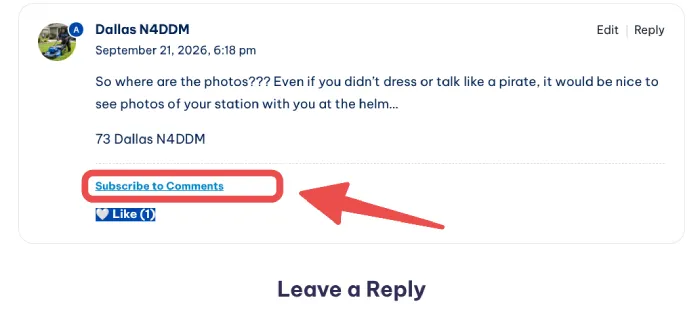
Prior to this update, if you have left a comment on a page, post or article nothing else happens – ever. The change now is that if there are replies to your comment, you will now be notified. This has been requested by several users who had people respond to comments, just to be seemingly ignored. Likely the other user just didn’t know the conversation had continued. Or, even if you did not post a comment, you can still subscribe to the discussion manually by clicking the Subscribe link on the final comment of any given discussion as shown in the image below.
Controlling the Noise

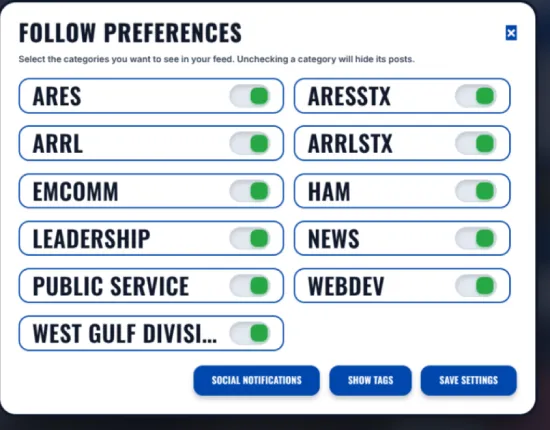
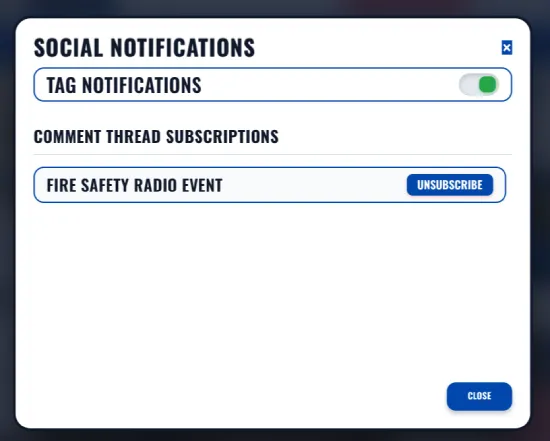
As mentioned these notifications can be stopped selectively by click the Follow Preferences shoe icon at the top right of the website. You will then be presented with a popup that allows you to select the news and blog post categories that you wish to follow or not follow. At the bottom of that popup is a button labeled Social Notifications. When you click that button you will be shown a new popup that allow you to unsubscribe to these social alerts at any time. We hope you can find these extended features helpful.
Did you enjoy this?
Log in to like this post.


Good updates/improvements!
Sounds like a great feature.